
Sunday, December 14, 2025
Home Blog Page 5

How to Develop Content Strategy – Simple Steps

0

As a content marketer, managing content is essential to reaching the right target audience. This will show your expertise in the field, as you will know how to build relationships with customers through content. 

However, only quality content and the best optimization techniques help build trust in your audience and long-lasting relationships. Whether you are a beginner or an expert, it is important to adopt flexibility in content creation and optimization to meet the right people for your business goals. 

Today! I will discuss how to develop content strategy. Let’s start!

What is content Strategy?

A content strategy is about how you plan, distribute manage and track your content to achieve your business goals. This will ensure that you can make most of your content if you use and create in proper way. 

Content attracts new users, builds trust and generates more business revenue. Also, it is about designing, writing guidelines, structure and content governance to make content quality that helps to generate more revenue. 

How to Develop Content Strategy?

Here are some effective tips for developing a content strategy.

Define Your Goals

Goals are important for every business, whether small or large firm. For your content strategy, it is important to set your goals first than what you want to achieve. Have set a mindset to improve customer engagement, generate more revenue, and attract more people. 

If you have clear goals, then you can easily define and develop a quality content strategy that fits your goals. In this way, you will have ideas about what type of content will help you to reach your target people. 

Research Your Target Audience

What type of people do you want to target for your business? A target audience is a specific group of people whom you will attract according to their needs and preferences. You can develop your content strategy according to your audience’s shared characteristics. 
How can you find your target audience and their behavior? You will need to research and analyze their behavior on social media, conduct surveys and get proper insights into what they like the most. This will help you to create an effective content strategy to meet their requirement. 

Conduct a Content Audit

If you are thinking of creating a new plan, then you must get insight and revise your already published content. This will give insights about your content, that, which content is working well, and what type of content your audience prefers. You can know about your content performance and whether it meets your goals or not. 

However, you can use tools to monitor performance, like social media analytics or Google Analytics. Keeping these aspects in mind you can develop a strategy to grow your business. 

Conduct a Content Audit

Choose Your Content Types

It is important to keep in mind when developing a content strategy that you know what type of content you will need to create. Also, check your target audience activities where they are spending more time. So, it is better to create content in various forms to engage your users on different platforms. 

Once you have decided on the type of content, now you will need to optimize your content. For example, if you have published a blog post, you will need SEO (Search Engine Optimization) strategies to rank your content on the result pages. 

Here are some types of content you can consider:

  • Blog posts
  • Case studies
  • Social media posts
  • Podcasts
  • Videos
  • Email newsletters
  • Templates
  • White papers
  • E-books

Content Plan

Content planning is another crucial aspect of content strategy. It is all about how you produce the content, ideas to meet the target audience and the right to publish. Make sure to publish the content at the right time; if you post an outdated topic, then it will cause a poor user experience.
However, you can leverage your content on different platforms to grow your business awareness. Repurpose your content and share it on different platforms to catch the audience across different channels. Additionally, you can use tools for content schedule and team collaboration to gather your team on one platform. 

Content Governance

You know it is important to make guidelines about content standards, policies, creation and publication. This will ensure consistency and provide quality and useful content. 

So, you will need to note some guidelines about style, material, research, tone and structure to produce good content. 

In this way, your team members and remote workers will be informed about your goals and criteria for writing or producing quality content. 

Content Creation Process

Now, that you have set everything according to your business goals and target audience, the next step is to start your content creation. Assign the tasks to your team members according to their skills, expertise and interests. 

For example, if a person is shy in the camera then assign other tasks like idea creation, writing or producing. In this way, the right person works for the right job. 

Measure and Track Content Performance

Now, when you have published your content, and your target audience starts engaging. Its time to measure the performance that how people engages with your content whether they like it or not. 

Even though you will not have any third-party tool to monitor, many social media platforms, blogs, YouTube studios, and other platforms offer insights about impressions, views, and the stay of users. 

This is the best way to know user engagement and try to make your improve your content that catches the people attention and helps to boost business. 

Summary

To make a business and content marketing successful, it is important to develop the content strategy carefully. You will need to keep in mind business goals and objectives to create and develop the content accordingly. Check your target audience’s behaviors and preferences, and also make sure to audit your content to get insights.

However, it is also important to determine your content and then develop content strategies. So, all these essential aspects contribute to how you manage content optimization that meets business objectives to stand out in the market. 

iPhone 13 Pro Max Review – Features, Specs, and Pricing

0

For owners of Apple iPhones, battery life has always been a significant problem. But in this aspect, a lot of things were altered with the iPhone 13 Pro Max. It is probably the first phone in the lineup to provide solid battery timing to users. Its shape and other features are almost similar to its only Pro version.

Still, we are going to discuss them in detail in today’s review article. Here, we dive deeper into analyzing what type of iPhone it actually is. Let’s start.

Also read our article iPhone 14 Pro Max Review to know about the latest Apple phone.

A Big Phone with a Solid Battery

iPhone 13 Pro Max is a big phone, that’s not hidden from anyone. This indicates that it might not be the right choice for people who like using standard-size phones. Not to mention the cover you’re going to put on it. It makes the phone look really big.

Let’s put this into perspective. The screen size of this phone is 6.7 inches. Its size dimensions are 160.8 x 78.09 x 7.65 mm. The device’s weight is 240g which clearly indicates that it’s large and heavier.

The battery, on the other hand, was a major point of discussion when the phone was released. It has a 4352 mAh battery. Our testing indicated that it can go for around 7 hours. This is an average time, however. It may vary according to the apps you run on it.

Overall Specifications

Screen size6.7 inches
Display resolution1248 x 2778
Camera12MP (2160p)
ChipA15 Bionic
RAM6GB
Battery4352mAh
iOS15 (upgradable to 17.5.1)
Weight240g
Dimensions160.8 x 78.09 x 7.65 mm
Release dateSeptember 14, 2021
PriceStarts from $1,100

Design

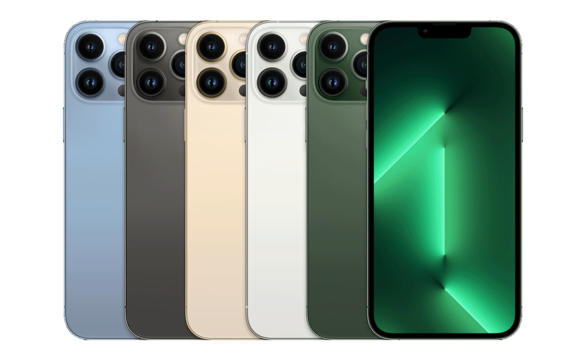
Nothing much has changed in the overall design of this phone. Its screen is flat and it doesn’t have any tapered edges. An interesting thing about its design is its shiny sides. They are flat and give an extra point to the phone’s style.

Although the phone is large, it doesn’t feel bad when you hold it in your hands. However, it might take some time to get used to the size when you put on a cover on it. The water and dust resistance of this iPhone is rated IP68. On the back, you get the three familiar cameras on it. Overall, the phone is sturdy and stylish in design.

Overall Performance

The overall performance of the iPhone 13 Pro Max is exceptional. We faced almost no major issues while testing its software. However, you should know that the A15 chip is based on the previous A14’s 5nm technology.

Yet the performance has increased to a great extent. It goes for both the CPU and GPU of the phone. Think of it the same as Android’s Snapdragon 888 processor but with some extra power and capability.

Its GPU performance impressed us the most. We ran an intense gaming test on this phone for around 25 minutes. The performance was constant throughout the whole time. This indicates that the phone doesn’t just show performance at the beginning of the gaming. It keeps going for a complete proper gaming session.

The Old Not-So-Fast Lightning Port

One important thing that we noticed about this phone is its low-speed lightning port. The “slow speed” term specifically applies to the speed of transferring files. That is because Apple is still stuck with the USB 2.0 file transfer speed.

When we take a look at the overall business concept of Apple, it all makes sense. This means that the company supports the whole idea of going wireless. So, they may prefer the idea of sharing files with AirDrop completely. However, if you don’t share data a lot, you won’t find any inconvenience with it.

Charging Speed

The charging speed of this phone is an important point to discuss here. The full charging time you get on this iPhone is around 1 hour and 30 minutes. It can be different for different situations. However, it won’t deviate much from this number. This indicates that the timing is very decent.

 If you use a more potent charger, like the Samsung 45W, it is much better. In around 30 minutes, you can fully charge your phone to 50% capacity. Things like these are useful when you have to quickly leave somewhere and need to charge your phone.

Camera

The cameras of the iPhone 13 Pro Max and 13 Pro are the same. It’s an interesting point to notice since the preview Max model had a big upgrade in the camera. The main sensor is still 12MP. But its overall quality has been increased. It’s very clear that the three cameras on the back are huge. They may not look appealing to many users. Its ultrawide camera has received some upgrades as well. The same goes for the telephoto lens. It is not 3x (0.5x more than the last year.)

Overall, it can capture really good pictures from both main and selfie cameras. The video quality is also top-notch. You can record 4K videos on this phone very easily. There are some specific camera settings within the phone as well. They can help you get the most out of it. 

Pros and Cons

The details of the pros and cons of this phone are discussed below:

Pros:

  • Sturdy and stylish design
  • Decent battery timing
  • Good charging time
  • GPU performance is very satisfactory
  • Top camera quality

Cons:

  • Huge size
  • Slow file transfer speed

Conclusion

In conclusion, the iPhone 13 Pro Max is a very ideal phone for people who like having powerful devices. That is because it has an A15 Bionic chip and 6GB RAM. For those who dislike large phones, it might not be the best option.

 It has a very decent battery timing. You can also charge it easily in one and a half hours. The design is very sturdy and stylish. This phone delivers very decent CPU and GPU performance.

The camera quality has been upgraded from the previous model. You can capture quality pictures and videos with it. We have reviewed this device in detail in the information given above.

FAQs

Is purchasing the iPhone 13 Pro Max worth it in 2024?

It depends on your personal preferences. You may want to take a look at newer models. Also, keep the budget factor in mind as well.

Can I use a more powerful charger than 20W on this phone?

Yes. You can use a more powerful charger than 20W with this phone as well.

Is this phone’s iOS upgradable?

Absolutely. You can upgrade its iOS 15 to 17.5.1

iPhone 14 Pro Max Review – Features, Specs and Pricing

0

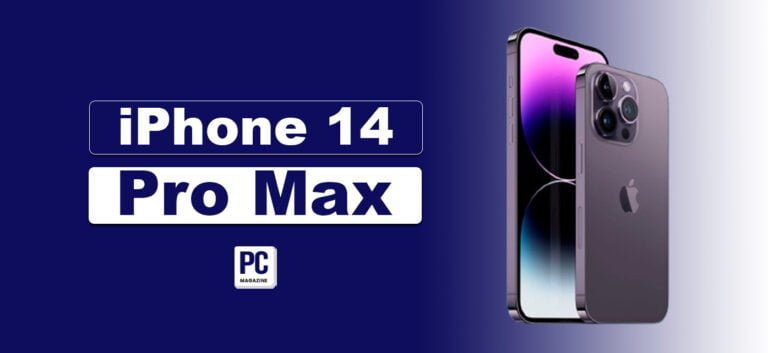
Apple is always successful in offering exciting features in a new model of iPhone. These features are usually enough to persuade people to upgrade. The same case is with the iPhone 14 Pro Max. It introduced a bunch of different features that were completely new in the lineup. The Dynamic Island is one of its biggest examples.

You should be aware of a few additional facts regarding this phone in addition to this. In today’s review article, we will go over some of its most significant features. Let’s start.

iPhone 14 Pro Max – Overview

It’s been almost two years since the release of the iPhone 14 Pro Max. It has been the first choice of many users even though another model has been launched by Apple. Well, we’re not going to compare them here. However, many experts have an opinion that if you have it, upgrading to 15 may not be necessary.

You may see why people think this way by taking a careful look at this device.

Its A16 Bionic chip gives it exceptional speed. Its Dynamic Island was a huge upgrade. Besides this, features like a powerful 48MP camera also made a lot of difference. We will go into the details of these factors next. For now, here’s an overview of the device:

Display size6.7-inch
Display resolution1290 x 2796
Camera48MP
Selfie camera12MP
RAM6GB
ChipA16 Bionic
Battery4323mAh
Weight240g
Display refresh rate120Hz
Operating SystemiOS 16 (upgradable)
Storage128GB/256GB/512GB/1TB
PriceRanges from $680 to $780 (may differ depending on the dealer and the area)

Design

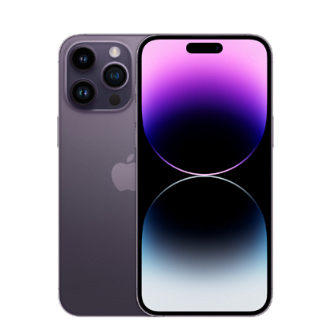
Its overall design hasn’t changed all that much. This applies to the back side where you see the old three camera lenses. Although they cover a lot of room. The front side is different due to the Dynamic Island. It is clearly noticeable when the screen is on.

Another noticeable thing about its design is its weight and thickness. Its size dimensions are 6.33 x 3.06 x 0.31. It makes the model clearly thicker than its predecessor. You get this model in four different colors. They are:

  • Deep Purple
  • Silver
  • Gold
  • Space black

The Dynamic Island

As discussed earlier, the Dynamic Island was one of the most noticeable features of this iPhone. It is basically a notch that’s placed on the top of the front screen. The interesting thing about this notch is that it has both the camera and the Face ID sensor in it. Besides this, it also shows the notification and other system information on it.

The reason why it’s called “dynamic” is because it isn’t fixed. This means that its shape, which is pill-like when static, keeps on changing according to different programs. This feature was definitely something new for iPhone users. It attracted a great deal of people to upgrade their phones. For example, it will change shape and show details while making a phone call. The image given below explains it:

 The Always-On Screen

Another new feature the users got to enjoy was the always-on-screen feature. This means that your screen remains dimly on even when you have locked your phone. Some people may not like this feature. So, Apple gave the option of turning it off completely. In general, getting used to it was a little hard for us during the testing procedures.

When this feature is on, you can almost see everything that’s on your lock screen. This includes your wallpaper, notifications, weather information, etc. There’s another interesting and advanced factor in this feature. It automatically goes off when you put the phone in your pocket or even upside down.

The Cameras

iPhone 14 Pro Max offers a 48MP camera for the first time in the lineup. It is ideal for capturing pixel-dense images of 12MP in size. If you like cropping your photos, using the Pro Raw mode can be useful. It captures images in full 48MP and covers as many details as possible. The zoom quality is also good (2X). However, it’s not as good as the S22 Ultra (10X).

The other two cameras of the phone are:

  • 12MP TrueDepth camera
  • 12MP ultrawide camera

They both enhance the quality of images according to their specifications. The better photo quality in low light is a great example of it. Its f/1.9 aperture has a lot to do with it. It allows the device to catch as much light as it can to keep the quality of photos decent.

As for video, you get two new features, the Action mode and the 4K resolution. Both of them have been a primary point of attraction for many videographers. Some even claim that you can shoot professional-level videos with this phone.

Battery

The battery life of this model is more than satisfactory. That is due to the introduction of a more efficient chip. It can offer you around 12-13 hours of battery life. This model still has 25W charging. The overall charging time varies according to the battery percentages.

 Pros and Cons

The pros and cons of this iPhone model are given below:

Pros:

  • Amazing camera quality
  • The introduction to the Dynamic Island
  • Availability of always-on display
  • Very decent battery life
  • Availability of the Action mode in video capturing

Cons:

  • Only 20W charging
  • It is heavier and thicker

Conclusion

To conclude it all, the iPhone 14 Pro Max has introduced some of the very new features in the iPhone lineup. It is a decent device to upgrade to if you care about the camera and the battery life. It contains a Dynamic Island that has completely changed the way iPhones look. It also has impacted a lot on the device’s functionality. Some other new features of this phone include an always-on display and the Action mode in video. The picture camera quality is also very amazing. We have reviewed this device in detail in the information given above.

Read also: Gabb Phone Review – A Kids Mobile Phone Without Internet

FAQs

Can the battery of the iPhone 14 Pro Max last for the whole day?

No. The battery of this phone can last for around half a day. The way you use it depends on this timing a lot.

How sturdy is the design of this iPhone?

The sturdiness of this phone’s design is above average. It also feels good when you hold it.

Is this phone ideal for purchasing in 2024?

Yes. It is a good choice to purchase this phone in 2024. Just keep your budget and requirements in mind.

10 Best PC Cases for Gamers to Choose From

0

Building a high-end gaming PC? The graphics card, the CPU, and the RAM are all exciting stuff to consider. But don’t neglect the house for all these awesome hardware components; this is the PC case!

Yes, we are talking about the PC cases, where all your hardware parts are gathered. Let’s help you find the perfect one for your next gaming machine, one that keeps things cool, looks amazing, and lets you show off your classy hardware.

Importance of Good PC Cases

Choosing the best PC case is essential for gamers who want to build a robust and stylish gaming computer. A good case supports your parts safely, helps with cooling, makes cable management simple, and leaves room for future upgrades. Whether you are building a high-end system with advanced cooling and large GPUs or a compact, budget-friendly setup, the proper case makes a big difference.

Read Also: How to Choose the Right Game Controller for Your PC

10 Best PC Cases for Gamers

Here are the ten best PC cases for gamers, considering different needs and preferences.

1- Lian Li O11 Dynamic EVO

Lian Li O11 Dynamic EVO is our top pick for the best PC cases, and it’s our top suggestion for gamers. This case is one of the best you can purchase, especially for gamers. It’s a mid-tower case with a dual-chamber design featuring glass panels on the front and side and screening on the top and behind the motherboard tray for good wind.

The O11 Dynamic EVO has plenty of room for fans and custom cooling setups. Although this case doesn’t come with pre-installed fans, it includes a front panel LED strip that you can control through your motherboard software or a hub. Another great feature is the ability to move the IO ports to four different spots on the case without using tools, making customization easy.

2- Fractal Design Meshify 2 Compact

The Fractal Design Meshify 2 Compact is a fantastic mid-tower PC case known for its stylish design and excellent cooling. It has a mesh front panel with a V-shaped design, and you can choose either a solid or moderate glass side panel.

The mesh front helps cool the case with the fans, and the top panel is also mesh for better wind. Simultaneously, panels have removable dust filters for easy cleaning. The case also has good space for cable management, keeping the inside neat. It can hold a lot of components, with room for GPUs up to 341mm long and CPU coolers up to 169mm tall. The PSU has a compartment at the bottom with drive bays. The top panel is easy to remove, making it simple to build your PC.

Fractal Design Meshify 2 Compact

3- Corsair iCUE 7000X RGB

If you want a PC case often used by enthusiasts and experienced gamers for a powerful machine, check out the Corsair iCUE 7000X. This case has a lot of space for all your components, including the giant graphics cards and E-ATX motherboards.

Read Also: Clevo PA71 Review – Best Budget Friendly Gaming Laptop

It supports up to 480mm radiators for cooling, so you can install even the most giant AIO liquid coolers. You can fit two 480mm radiators and add another one on a different panel. A custom open-loop cooling system is also possible. Like other full-tower cases, the Corsair iCUE 7000X is big, so keep that in mind when moving it and implementing hardware. It’s also quite expensive, so be prepared for the high rate.

4- Phanteks Enthoo Pro 2

The Phanteks Enthoo Pro 2 is one of the best PC cases. It’s spacious enough to fit two separate PC builds, adaptable to a main setup with an E-ATX motherboard and a minor ITX system at the bottom. It is ideal for power users and streamers needing a dual PC setup and supports SSI EEB motherboards for business use.

This case is perfect for fully water-cooled builds with custom loops, allowing for easy cable management and adding components like pumps and reservoirs. It offers excellent airflow with a durable nylon mesh front panel and can hold up to 15 120mm fans. It also provides extensive storage, fitting up to eleven 2.5″ SSDs and four 3.5″ HDDs, making it ideal for high-performance PC builds.

5- NZXT H9 Flow

The NZXT H9 Flow resembles the Lian Li O11 Dynamic because of its similar design. While many brands try to copy the Lian Li style, NZXT adds its unique touch. The H9 Flow clearly shows NZXT’s design language, similar to their other cases. It has a lot of internal space, allowing for many fan and radiator mounts, making it great for powerful gaming PC builds. You can install up to three 360mm radiators for a custom cooling solution.

Like other NZXT cases, the H9 Flow excels in cable management, especially with a modular power supply. However, the included fans are rifle-bearing, which could be better, and there’s no pre-installed RGB or fan hub controller. It will look great and handle long gaming sessions without overheating.

6- Phanteks P400A

When buying expensive parts for a high-end gaming setup, costs can add up quickly. The Phanteks Eclipse P400A is an excellent choice because it’s priced under $100, the most affordable in this lineup. Don’t underestimate it— It has installed two or three 120mm fans, depending on the model. We suggest the RGB version with three RGB fans and lighting strips.

You can add two more 120mm or 140mm fans on top and one 120mm fan at the back. This case is made for AIO cooling and can fit up to a 420mm radiator at the front and a 280mm radiator at the top. It fits GPUs up to 420mm long, even the most giant graphics cards.

7- Lian Li Air Mini O11

The Lian Li O11 Air Mini is a compact version of the regular O11 Dynamic PC case, perfect for setups with limited space. Its mesh front panel increases wind, unlike other O11 models. You can add three 120mm fans or two 140mm fans on the top and bottom panels, plus two more 120mm fans on the side.

Despite its size, the O11 Air Mini supports water cooling well, fitting multiple radiators smoothly: up to 280mm at the front and 240mm on the side and bottom. It put up E-ATX, Micro-ATX, or Mini-ITX motherboards, GPUs up to 362mm long, and CPU coolers up to 170mm tall. With seven GPU slots, it includes front panel features like two USB 3.0 ports, a USB 3.1 Type C port, and audio ports.

8- HYTE Revolt 3

The Hyte Revolt 3 looks much like the NZXT H1 but has some crucial differences. It is well-designed and built. It’s easy to make a PC whether you get just the chassis or the one with the PSU inside. It only supports Mini-ITX motherboards, so it’s pretty compact, but it’s one of the best choices if you want a small case without giving up too much.

Amazingly, you can fit a 280mm radiator inside this case, making it great for a powerful PC that can handle overclocking. It’s available in black and white, both stylish options. The case limits the graphics card size to 335mm, which means you could fit in a big GPU like an RTX 40 series. There are three PCI slots, so even the most giant GPUs should fit as long as they fit within the case’s dimensions.

Fractal Design North

9- Fractal Design North

We’re still determining who thought of combining mid-century modern design and excellent airflow in a PC case, but Fractal Design did it with the North mid-tower, and we’re glad they did. It’s available in a mesh side version or tempered glass, in white with chrome accents, or black with brass details—making it the most beautiful PC case ever made. It comes with two 140mm fans and has a side bracket.

This setup gives an excellent cooling performance but can get noisy when running at full speed. Opting for the glass side panel might reduce noise but could impact cooling efficiency. If you don’t like the design, Fractal’s Meshify 2 Compact might suit you better. We hope Fractal’s innovative approach encourages other casemakers to try new ideas.

10- Lian Li Lancool 216

Priced starting at just $100 (or $15 more for an RGB controller and extra USB ports), the Lian Li Lancool 216 combines excellent design elements from the more expensive O11D Evo and Lancool III cases. It features a handy PCIe fan mount and large 160mm RGB intake fans. You can move the top IO panel to the left side near the bottom if you place the case on your desk.

While the LanCool 216 isn’t the quietest case, it excels in thermal performance, especially if you add a rear 120mm fan below the GPU mounts using the included bracket. There are many cases around the $100 mark, but the 216 stands out with its unique features, excellent airflow, solid design, and superb cable management.

Lian Li Lancool 216

Final Verdict

PC cases come in many types to suit different needs and tastes. You might like the sleek, airflow-focused designs. Whether you prioritize style, performance, or price, cases above mentioned cases could be perfect for your gaming PC on every budget. However, you should understand your requirements and choose one that aligns with your needs.

iPhone 15 Pro Max Review – What’s New and Exciting?

0

Whenever a smartphone is about to be released, people have high expectations of it. People use the mobile phone and give their opinion about it. The same people may have different opinions after a few months of using the phone. That’s what I experienced with the iPhone 15 Pro Max. It has been over nine months since this masterpiece was launched by Apple.

I have used this phone as my primary device since then. The whole experience comes to one point: it’s worth every penny. You will learn more about this experience in this review article. Let’s start.

A Transition from Android to iPhone

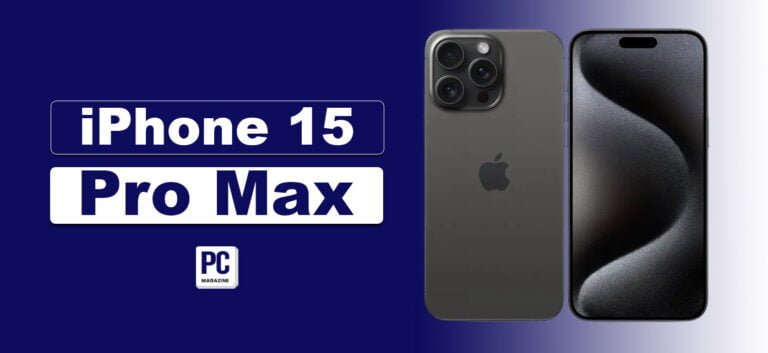
iPhone 15 Pro Max had a special impact on people who have been using Android for a while now. That is because it offers features that persuaded them to join the Apple Ecosystem. And it’s not just about the software. The build structure of the phone has a lot to do with it – especially the titanium build.

When you hold the phone, it feels compact and sturdy but still comfortable even without a cover. It’s very amazing to know that Apple was able to fit such powerful technology into this compact structure.

The change in the lightning port gave many Android users a sense of victory. That is because Apple, after a very long time, switched the port to general USB-C.

The Introduction to the Action Button

The lightning port isn’t the only thing that Apple decided to replace. They also did it with the traditional and iconic ring/silent switch. Now they have put an “Action Button” in its place. Its basic functionality is that it performs its assigned task once you press and hold it. This task can be assigned from within the phone.

As for its actual usage, I’ve noticed that I rarely use it. It’s true that it is a quicker way of using a feature. But we’re used to performing such actions in the older way so of iPhones. So, it indicates that this button may not be revolutionary for many people. But still, there are some people who love to use this button to immediately access a certain feature.

New Camera Features

iPhone 15 Pro Max has had some new camera features as well. They have come in pretty handy throughout my experience with it. Especially the new telephoto lens. It’s only exclusive to the 15 Pro Max in the lineup. Using this feature was very convenient. For example, I was able to capture better optically zoomed photos. 

You can now even use the 25x zoom feature. It can literally be used as a magnifying glass. Although I didn’t need much zooming in everyday life. Another noticeable feature is the combination of Live and Portrait photos.

You can capture people moving around with maximum accuracy. When you open the pictures, you can choose the option of a Live photo or a portrait. Unfortunately, there’s no option for recording Spatial videos. It has been a huge worry for Apple Vision Pro users.

The Controversial Front Glass

Just like every other iPhone, the front glass of the iPhone 15 Pro Max has been the target of many critics. And I partially agree with them. I’ve seen users complaining about how easily the glass can catch scratches. And to be fair, I’ve noticed some of them on my model as well. They’re not as intense as people are saying, but still, they get on the screen very easily.

Despite having a ceramic shield and a high price tag, showing such issues is very disappointing. The scratches are invisible when you’re using the phone. As soon as the screen goes dark, they pop up right in front of you. If you use it without proper cover, you may have to reduce the price in case you migrate it to someone else later.

The good thing is that future users will not have to face this problem. That is because the rumored iPhone 17 has an anti-glare glass that will be protected from such scratches. But as of now, you’ve got to compromise with this drawback.

The Pros and Cons

The pros and cons of the iPhone 15 Pro Max after using it for more than 8 months are given below:

Pros:

  • The Action button is useful for many people.
  • The battery timing has been stable for most of the time.
  • The newly added camera features enhance the user experience.
  • The newly added lightning port makes the phone a little more universally compatible.

Cons:

  • Screen scratches can be a problem for users.
  • Your muscle memory may force you to ignore the Action button.

Should You Upgrade to iPhone 15 Pro Max?

I have described every detail of our experience with this phone. The discussed factors are the ones that you will notice after using the phone as your primary device. This indicates that everything is right in front of you. It’s your decision to decide whether or not to upgrade to this model.

In general, if you want to have a completely new experience with the camera, we recommend upgrading. If you don’t own an iPhone already, we again recommend purchasing the iPhone 15 Pro Max. It will give you a completely new experience of using smartphones.

Conclusion

In conclusion, the iPhone 15 Pro Max has had a very positive impact on me. It is a massive upgrade in the line of iPhones due to many reasons. The change in the lightning port is one of the biggest examples of this. Also, the new Action button can be useful if you get used to it. The camera has been upgraded a lot as well. It has new zooming features that can offer you a great user experience.

As for build quality, it is a sturdy and compact phone to hold. There have been complaints about the front glass, however. But that’s not something new with the iPhones. Besides this, the overall experience was very good. I recommend upgrading to people who care about advanced camera features. The same goes for Android users considering joining the Apple ecosystem.

Frequently Asked Questions (FAQs)

Is the iPhone 15 Pro Max worth buying in 2024?

Indeed. The reviews about the phone have mostly been positive. So, it’s a green light to purchase the phone this year.

Is it a massive upgrade from the iPhone 14?

I wouldn’t use the word “massive” for this upgrade. But still, there are a lot of new things in this new model.

Can its camera be used professionally?

Yes. Its camera can be used professionally as well. However, it’s not powerful enough for handling high-quality work such as wildlife photography/documentary.

How good is the battery of this phone?

This phone’s battery is above average. I faced no major issues during my usage period.

Top 10 Best Streaming Websites in 2024

0

There are multiple streaming websites which have gained a lot of popularity in a short period of time. These platforms consistently offer high-quality video content to those who prefer to enjoy their new favorite movies and TV shows at home rather than going to the theater. These streaming websites are gaining more views, as millions of viewers throughout the world watch TV shows, movies, and amazing web series daily.

These streaming websites continuously add new video content on their platform, and you can access this content in exchange for obtaining monthly subscriptions.

10 Best Streaming Websites

There are multiple streaming websites with varying offerings. Here is a list of the best streaming websites you can enjoy in 2024:

1.  Netflix

Netflix tops the table among other streaming services even though the prices of its subscription plans have increased, facing tough competition from renowned services like Amazon Prime, Hulu, and Disney Plus. It was previously a movie rental service which then emerged as a top-notch streaming website. Most users prefer this streaming service because it offers popular original series such as Squid Game, Stranger Things, Wednesday, Money Heist, and more, which have captivated millions of viewers worldwide. This platform has received a lot of praise from users and has won numerous awards, which are contributing to its remarkable global popularity.

This streaming site also provides a huge range of the most famous TV shows, web series, films, documentaries, and more that its competitors are not even close to. New shows and movies arrive every week on this platform. The company is also focusing more on creating new categories for gaming, kids, and anime with captions in multiple languages. Netflix standard starts with ads at $6.99/month.

2.  Disney Plus

It is one of the best streaming websites and is in close competition with Netflix. This is the only platform where you can stream the vast range of Disney and Pixar libraries that include Star Wars movies, Marvel Studio Films, new entertaining shows, National Geographic content, etc.

It also has gained millions of views from the movies named Avengers Endgame, Deadpool, Free Guy, etc. Its ad-based subscription plan starts at $9.99 per month. It is the least expensive streaming platform and provides excellent TV shows and movies that you love watching. Disney Plus offers three subscription plans, with prices ranging from $9.99 to $19.99 per month.

Read Also: XMovies8 Review – Watch Free HD Movies Online

3.  Max

This streaming website offers a wide selection of popular TV shows and movies, including the complete libraries of HBO and DC Universe titles, as well as every Studio Ghibli film. It is the destination where you can find new Warner Bros-owned feature films. It also has a vast section for kid’s entertainment and provides the ability to control the ratings on kid’s profiles, which is better than any other service.

Max is also increasing its streaming services by creating its originals, to increase its popularity globally. This platform’s subscription plan starts from $10 per month, and if you want an ad-free experience, the cost will increase to $17 or $21 per month. This platform also provides live sports streaming in its current package, but some optional features can cost an additional $10 per month.

4.  Hulu

Hulu is one of the best-streaming websites and a great alternative to Netflix, providing a huge collection of multiple TV shows from channels like ABC, Fox, Animal Planet, CNBC, CNN, Discovery, and more. You can watch these shows live and after they air, as well as their original series like Only Murders in the Building, The Great, The Handmaid’s Tale, and more. If you have an extra $7.99, it is worth buying its ads-tier subscription to get multiple TV options. This platform also allows the plan upgrade without ads for $17.99 monthly.

5.  Prime Video

The default version of this streaming website contains ads and provides an option to pay an extra $3 fee to view shows without them. The commercial breaks on this platform are pretty short compared to other streamers. You can watch multiple quality TV shows, movies, and other scheduled sports events. Although it is a good streaming site, but it lacks many in-demand series and catalogs that users can easily watch on Netflix, Hulu, and Disney Plus.

Its menus are not user-friendly, and the categories are mixed with paid and free content. However, they aim to improve this confusion with clear labels and menu updates for their global customers. This platform also provides its own Prime Video channel without any additional cost. If you want to watch its originals and other movies, consider paying $8.99 monthly.

6.  Starz

Its library of films and originals is unique and broad, with over 800 movies varying in multiple categories, from 80s classics to the top new Sony releases in its catalog. Starz is consistently making its mark in the competitive TV market with a strong lineup of original shows. This platform is well known for movies like Power Universe, The White Queen, and other Lionsgate movies and shows such as John Wick and Saw.

Starz has also secured a deal with Universal to air its series like Jurassic World Dominion, Minions, the Rise of Gru, Oppenheimer, and more. The subscription plan starts at just $9.99 per month, offering unlimited downloads and early access to new episodes of TV shows without any ad. This platform is worth the cost if you want to watch blockbuster movies, documentaries, originals, and other content for kids.

7.  ESPN Plus

ESPN Plus is a fantastic streaming service for dedicated sports fans who want to watch events from the National Hockey League, Major League Soccer, and UFC. This streaming platform also organizes complete UFC matches and other pay-per-view events such as UFC Fight Nights, Championship sessions, and more.

This streaming service suits those who are die-hard fans of their home teams and want to watch their team’s actions. Local games are not listed on these platforms, so you have to obtain access to regional sports networks via cable in order to watch them. The independent subscription for ESPN Plus is $10.99 per month, and users can also pay for it via Disney bundles.

8.  Peacock

Peacock provides access to more than 80,000 hours of video content in its premium ad-supported plan which is priced at just $5.99 per month. You can upgrade your current plan to Premium Plus for $11.99 per month if you want ads-free streaming.

The video content includes multiple TV shows, movies, news, and live sports. Users can further watch Premier League Soccer matches, WWE events, and other originals. Peacock is facing a significant drop in its rankings due to ineffective mobile downloads, non-premium plus subscription plans, and limited 4K HDR streaming that other competitors are offering. You can enjoy it premium plan for $5.99/month.

9.  Paramount Plus

This platform is also considered one of the best streaming websites, which allows users to stream live news and sports as well as multiple TV shows and movies, including originals from companies like CBS, MTV, BET, Comedy Central, Nickelodeon, and its own Paramount Pictures movie studio.

This service provides 30,000 episodes of multiple TV shows, 2500 movies, and many original series that arrive yearly. You can choose a $5.99 plan with ads or a $11.99 add-free monthly plan. This platform is widely known for its stunning originals like Mission Impossible, Iron Man, Top Gun: Maverick, Transformers, and more.

10.  Apple TV Plus

This streaming website only contains its own originals and does not provide any other movies or catalogs to explore. However, it offers robust features like 4K resolution, mobile downloads, HDR, and more. It now has more than 50 shows and high-budget movies from which only a few of them captured user’s attention globally, like Ted Lasso, Severance, and CODA.

Its subscription plan starts from $9.99, which is also expensive as compared to other streamers. It is not on the list of best-streaming websites, as other companies are providing a wide range of features and quality video content at a cheap rate.

Concluding Thoughts

There are multiple best streaming websites that provide the latest TV shows and exclusive access to valuable video content from which you can watch your favourite movies exactly at the date of their release. It is important to carefully choose a streaming platform that offers fair pricing for additional features and provides a user-friendly interface for easy content search. You must compare the offerings of multiple streaming services to each other, which will help you in choosing the best option to fulfil your streaming needs.

Clevo PA71 Review – Best Budget Friendly Gaming Laptop

0

Do you want to buy a new powerful gaming laptop or just want to upgrade an existing one? If so, then Clevo PA71 is the best option for you!

The Clevo PA71 gaming laptop model is attracting a lot of gamers due to its modern design, stunning performance, and robust features. This device is best for heavy gamers and other professionals who require a high-performing machine to manage their workload effectively. In this review, we will take you to examine its features, specifications, and performance in detail so that you can easily decide whether to buy this device or not.

Clevo PA71 Features Overview

Hardware/SoftwareSpecifications
Screen Size17.3″
Maximum Resolution3840×2160
Speed2.8 GHz
ProcessorIntel i7-8th Gen
RAM16 GB
RAM TypesDDR4
Storage512 GB
Storage TypeSSD
OSWindows 10
GPUNVIDIA GeForce RTX series

Features In Details

Design and Build Quality

This Clevo Clevo PA71 has an ultra-modern design and a shiny black matte finish. Its lid contains the CLevo logo and has 4 rubber feet at the bottom for firmness. The overall build quality of this device is extraordinary and looks visually appealing. Its keyboard is illuminated with personalized RGB lighting, and the touchpad is responsive and wide.

Clevo PA71 Review

Display

The Clevo PA71 laptop provides an HD IPS display with a resolution of 1920 x 1080 pixels. Its display attracts users with its matte finish look which allows them to use in brighter environments with ease. Gamers and other professional graphics designers prefer this device due to its stunning color accuracy.

Performance

This machine has a built-in Intel Core i7 processor. This 9th generation processor has a minimum speed of 2.6 GHz and a maximum speed of 4.5 GHz. Moreover, it also features a GPU of NVIDIA GeForce RTX series. Both these components give a high-quality gaming performance and manage in-depth graphics tasks with ease. These specifications are best for heavy gamers as they can easily play most realistic graphics games.

Clevo PA71 Processor

Gaming Performance

The overall gaming performance of this laptop is quite stunning due to its robust built-in processor and GPU. It has the ability to provide lag-free gaming experiences to fulfil every intense gamer’s needs. It has a 144Hz of refresh rate, which is quite good as it helps in minimizing the blur motions and results in improving the overall gaming process.

Storage and Memory

The Clevo PA71 offers a 512 GB SSD and 16 GB of DDR4 RAM. This improves the overall read and write speed of data which is considered best for intense gamers and other professional graphics designers. This device can easily handle heavy workloads and offers effective multitasking to users.

Cooling System

It is essential for all gaming laptops to have an effective thermal management to maintain the temperature while performing heavy tasks on it. This laptop provides robust cooling system via placing fans and heat pipes strategically that boosts the overall performance of the device. This also helps in maintaining constant frame rates and avoid from reducing the clock speed of the processor when temperature rises.

Keyboard and Touchpad

The keyboard of this device offers a personalized RGB lighting which looks attractive to human eye. There is a good spacing between the keys which enables users to type continuously and comfortably for long time periods. The touchpad is also user friendly as Clevo has largen it in this model which is highly effective for users to navigate through the operating system and other applications easily.

Webcam and Audio

Clevo has provided a built in 720-pixel HD webcam in this model which allows gamers to do live gaming sessions on their YouTube channels and interact with audience simultaneously. The video quality is extra ordinary which makes it best for video conferencing and online streaming. The audio quality is outstanding which gives clear and energizing sound.

Battery

The battery life of this device is considered average as compared to other gaming laptops. It has a 62-Watt hour battery which can be used for more than 4 hours in normal mode. The overall lifetime will be decreased, if you use it for intense gaming purposes without connecting a charger.

Connectivity

The Clevo PA71 has a wide range of connectivity options like Wi-Fi 6, Bluetooth 5.0, Ethernet Port, and more. It also gives 3 USB ports, HDMI, mini Display Port, and an audio jack so that users can easily connect external devices to it without adopting other complex procedures.

Operating System

This device offers a pre-installed Windows 10 without any third-party or unnecessary installed software. The operating system comes with a Clevo Control Center which helps users to personalize the keyboard’s backlights, fan speeds and other display settings.

Clevo PA71 Price

The current price of this high-end gaming laptop is around $2018. This device provides outstanding performance, excellent display and wide range of exceptional features which make it a worthy investment for gamers and other professionals to manage their heavy workloads with ease.

Top Reasons to Buy Clevo PA71

  1. Effective Performance

The Clevo PA71 laptop is a top choice for gamers as it provides strong performance and can easily manage heavy games and applications. This device is installed with a high-performing graphics card and processor, which allows intense gamers to run games smoothly at a fast speed. Its robust cooling system maintains ideal temperature for components like processor and GPU during long gaming sessions.

  1. Exceptional Display

Its 17.3-inch widescreen provides a crystal-clear HD IPS display that pays attention to each pixel and allows both gamers and professional content creators to perform their tasks efficiently. Its wide angles and robust color accuracy make sure that the visuals appear sharply which helps you to play intensive games and perform any other multimedia tasks on high resolutions.

  1. Stylish Design

This laptop is crafted with premium materials which shows a durable and stylish design. Its keyboard contains an RGB LED backlight that provides an effective typing experience which is best for gamers and other professionals to use it in low lights. It is specifically designed to improve its airflow and heat dissipation which keeps the device calm and smooth during intense gaming sessions.

Clevo PA71 Pros and Cons

ProsCons
Good Memory & StorageInsufficient Battery Timing
Great DisplaySound Issues
Best Graphics for GamingPixel Problem
Smooth Keyboard

Our Opinion

The Clevo PA71 gaming laptop offers exceptional gaming performance with cutting-edge hardware and a vibrant display. Its wide angles and robust color accuracy make sure that the visuals appear sharply, which helps you play intensive games and perform any other multimedia tasks in high resolution. This device is installed with a high-performing graphics card and processor, which allows intense gamers to run games smoothly at a fast speed. 

reMarkable 2 Review – The Best Digital Paper Tablet?

Writing with a pen on paper feels considerable, whether taking notes in a meeting, studying in class, or brainstorming new ideas. The reMarkable 2 combines this old-school feeling with modern technology by working like a notebook and a tablet, letting you write digitally. It is great for making lists, jotting down notes, and drawing. We tested it thoroughly at the Good Housekeeping Institute, checking how the pen feels and how long the battery lasts. Its stylish design and versatility make it an excellent choice for anyone who wants to quickly turn handwritten notes into digital files without worrying about losing them.

Remarkable 2 Specifications

HardwareSpecifications
Weight0.88 pounds
Size187 by 246 by 4.7 millimetres
Screen10.3-inch black and white digital paper display
Storage8 GBs
Cloud ServiceMonthly Service Plann
WaterproofNo
Battery TimeUpto 2 Weeks

Key Features of reMarkable 2

Text Transcription

Before we discuss how this tablet feels like paper, it is crucial to highlight its best features. With just a tap on the screen, reMarkable turns handwritten words and punctuation into typed text. Once it’s converted, you can save the text in a document.

Paperlike Surface

I wasn’t sure if a digital tablet could feel like writing on paper, but I was convinced in seconds. The pen moves smoothly on the tablet’s surface with hardly any noise. reMarkable’s CANVAS display responds quickly, with a delay of only 21 milliseconds. Remember, it has no built-in light, so consider getting a book light.

Export as PDF

Do you enjoy doodling or drawing in your spare time? I need to find out how useful reMarkable’s PDF export feature can be. You can brainstorm ideas, create mind maps, or sketch your organizational chart. When you’re done, export your creation to save and share it.

Read Also: 10 Best Coolest Gadgets for 2024

File import

When bringing in files, one of the reMarkable 2’s handy features is annotating documents. Just import the file from the website, then use a pen to add notes. You can only import PDF, EPUB, JPG, and PNG files, so save your documents as PDFs before transferring them.

Available keyboard

Focusing requires a lot of work, and there are many distractions around. The reMarkable lets you work without getting sidetracked by social media and online shopping. The keyboard costs $199, though, so you can only type on your reMarkable if you can do it without it.

Performance

Work with the reMarkable 2 Tablet

Writing on the reMarkable tablet is easy. The screen responds quickly, capturing your words as you write, so there’s no delay when taking notes in a meeting. However, there needs to be a slight delay when transcribing your handwritten notes. It takes about 30 seconds for a page or so of text to be converted. Exporting the transcribed text is quick, though. With just a few taps, it’s sent to your email.

Battery life

The reMarkable 2 only needs a little power, even if you use it a lot. It can last up to two weeks on one charge and even longer if you use it less. Charging the tablet is easy; it comes with the USB cable you need. However, charging takes a few hours when the battery is almost empty.

Design and Build Quality

The remarkable 2 is a robust, light tablet that’s easy to carry. Using a protective case to protect the screen from damage is essential. All the controls are on the screen; you can operate them with a pen or finger. One problem is that the writing instrument tip isn’t covered, so I’m cautious about putting it in my backpack or purse to avoid damage. The stylus sticks to the tablet with magnets, so using a particular case would make it less convenient. The stylus works well; it is comfortable and easy to use, and you can adjust how thick or thin the ink appears. At first, changing the writing instrument tips can be tricky, but you’ll figure it out after a few tries. My only issue is knowing when to replace the tip is hard.

reMarkable 2 Tablet Pros and Cons

ProsCons
Long battery time Costly for what it offers
Stylus sticks with magnets for easy storageNeed to pay for a plan to sync with devices
Exports quicklyChanging the stylus tip can be hard
Thin and lightNot many options for exporting
Easy-to-use interfaceNo light behind the screen
Lots of different templatesSometimes doesn’t keep line breaks when transcribing
Screen easy to see outsideSupport is limited
100-day guarantee if you’re not satisfied

reMarkable 2 Price

reMarkable sells its products on its website. When you buy the reMarkable 2 tablet, you have two price options based on the stylus. The version without an eraser costs $399, and the one with an eraser costs $449. I found the eraser unnecessary because I can easily erase using the Undo button or the stylus tip, which works better for me. You can also find reMarkable on Amazon, but prices are similar, and they don’t offer the cheaper stylus option. A $549 version on Amazon includes a one-year trial of Connect, reMarkable’s cloud service for transferring text to other devices. After the trial, connect costs $2.99 a month and gives you unlimited cloud storage. I prefer emailing and copying my text into documents, which works fine. However, the subscription might be worth considering if you want to save time or store many documents.

reMarkable 2: Is it for you?

The reMarkable 2 tablet is more environmentally friendly and convenient than pens and paper. Despite these benefits, the high price is hard to justify. I bought the reMarkable 2 because I enjoy writing by hand, it is calming and helps me think. I mainly use it to take notes during meetings, which I then save in Word documents. This way, I can organize my files easily on my computer instead of dealing with paper. If you often need to take handwritten notes, especially if you share them with others, the reMarkable is worth considering. The real test is whether you enjoy writing by hand. Whether for journaling or writing stories, the reMarkable might be worth the investment if writing brings you joy.

Final Verdict

The reMarkable 2 is a simple yet particular device with essential features. When you take it with you, you don’t need extra items like earbuds or batteries. If you don’t write by hand often, it may not be worth the cost, but it’s a suitable replacement for using pen and paper.

Steps to Play Slice Master Online

0

When Fruit Ninja came out, it had the world by the storm. It was played by millions of users around the world. Now, there’s another similar game called Slice Master. You have to cut fruits in this game as well. However, you get to do it in a different and more interesting way.

The game has a very sophisticated nature. It gives a satisfying and realistic feeling of cutting fruits. In this article, we are going to discuss simple steps you can follow to play it. So, let’s get started.

What is Slice Master?

Slice Master is a simple yet interesting game where you get to cut different fruits and objects. The game has a 3D nature. This gives the game a completely new and modern look.

The gameplay:

The gameplay of this game is straightforward. You have to cut fruits and objects that are placed on a straight surface. You get to do it with the help of a knife. The knife goes up in the air and drops on fruits to cut them.

The challenge:

The main challenge of the game is to control the knife. You have to control its trajectory with your mouse click. The more you click the higher the knife goes. You have to stop clicking when the knife is in the best position to cut the fruits.

The obstacles:

There are different types of obstacles also present in the game. If the knife hits them, the game will be over. The gap between the platform and some spikes is a major example.

In the end, you have to hit the knife at a finishing surface. The higher you hit the more points you get.

Steps to Play Slice Master

Here are the details of these steps:

Step 1 – Searching for the game:

This game is present on different online platforms. So, you have to search for it first in order to play it. For that, you can utilize any type of Internet browser. After opening it, enter the game’s name in the search section and hit enter.

Step 2 – Picking a website:

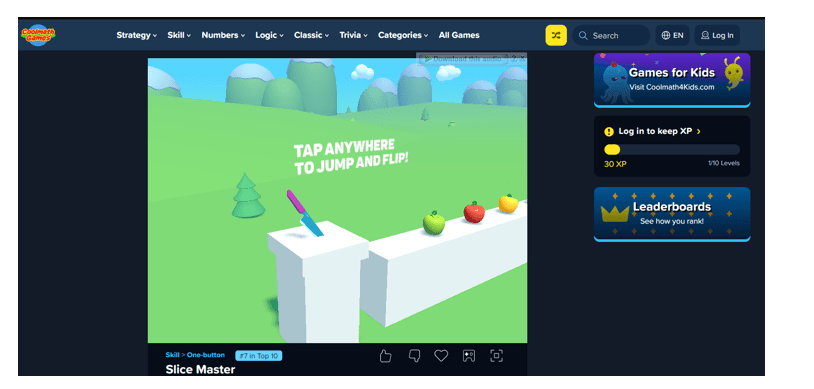
As discussed, different sites offer this game to their users. You have to pick on from the given search results. You can pick the one that you like the most. Later in this blog, we will offer some key points. They will help you pick the right site. For now, we’re going with the one shown in the image below with the link (https://www.coolmathgames.com/0-slice-master)

Step 3 – Play the game:

Once you are on the site, tap/click the screen to start playing. Make sure to understand the game mechanics fully in the first few tries. After that, you can start practicing to get better at it.

Picking the Right Site for Playing Slice Master:

The following tips can help you pick a decent site to play this game:

  • Pick a site that is absolutely free to use.
  • It should have an account creation option. This feature is useful when it comes to saving in-game progress.
  • The site should be safe from any major malware threats.
  • It should be accessible on a mobile device as well.
  • It should contain extra features like playing in a full-screen mode.

Tips for Mastering the Game

Slice Master may seem like an easy game to play. However, playing and mastering it isn’t easy at all. The following tips can help you with that:

  • First of all, be patient while playing the game. Rushing can make you skip fruits/objects and you will end up losing points.
  • Don’t over-click the knife. It will also cause you to miss the fruits.
  • Strategize your knife jump so that it falls on the fruit perfectly.
  • Jumping higher can help you cut the objects that are taller.
  • Carefully understand the platform. It will help you locate and avoid any obstacles.
  • Don’t forget to try out different knife options available in the game.

Final Comments

Slice Master is a game with advanced gameplay and features. You get to cut fruits and objects with the help of a knife in it. The game is of 3D nature. Its objective is somehow similar to the Fruit Ninja game. That is because you get points by cutting the fruits.

There are different websites on the Internet that offer this game. They may have a slightly different gameplay, but the mechanics are the same. We have provided a complete guide on how you can play this game online. Besides this, we have also indicated some important points you should look for in a site before picking it to play this game. The game can be challenging for some people. So, we have also discussed some useful tips for mastering it.

Frequently Asked Questions (FAQs)

Does Slice Master have an app version?

No. There’s no official app version available for Slice Master.

Can I play this game on a mobile device?

Indeed. Most sites are accessible on mobile devices. This means that you can play this game on your phone as well.

Is this game free to play?

Absolutely. This game is completely free to play.

Are there any in-game item purchasing options?

No. The game does not have any such feature yet.

Can I change my knife type?

Yes. There are different knife options available in the game. You can purchase them in exchange for collected points.