LinkedIn is the standard platform for bringing together people worldwide in the modern world of professional networking. It helps you grab the attention of potential employers and recruiting agencies to get hired for your dream job. To truly utilize this platform, you need to optimize your profile well and engage your audience through personalized and compelling interactions rather than only sending out generic messages. This is where ChatGPT comes into play and makes LinkedIn profile optimization easier.
This article contains a complete guide on how to use ChatGPT to optimize your LinkedIn profile effectively.
ChatGPT – An Overview
ChatGPT, the AI language model, was developed by OpenAI and is based on the GPT-4 architecture. It is capable of processing and analyzing massive amounts of data. The application produces natural language answers to any given query or prompt. From product description and marketing messages to poems and video scripts, you can create anything with ChatGPT.
How Is ChatGPT Used?
ChatGPT is an AI model and programmed on vast data to understand human language and react naturally. It creates writing that resembles human writers using a deep learning system. It creates new text in response to cues and uses a neural network to predict the possibility of words or phrases. ChatGPT is perfect for producing engaging headlines and compelling descriptions. It can also be used for attention-grabbing call-to-actions on LinkedIn profiles and content.
Tips to USe ChatGPT to Optimize Your LinkedIn Profile
Personalized Connecting Messages
With the help of ChatGPT, users may Personalize LinkedIn connection requests to each candidate’s professional background. To establish a sincere and exciting relationship, users can pick a LinkedIn user’s profile, extract their work experience, enter it into ChatGPT, and edit the message. Additionally, ChatGPT can alter the message’s style and tone to make it more exciting and helpful in establishing rapport. Using this tool, you can make LinkedIn relationships more fruitful and exciting.
Increasing LinkedIn Engagement with Videos
Consider integrating video into your LinkedIn strategy for a more personalized touch, even though ChatGPT is excellent for text-based content. Use video to tell your story, share your experiences, and offer ideas to engage people more deeply. Remember that using videos to generate leads on LinkedIn can be effective. Fortunately, there are several ways that ChatGPT may improve the process of creating videos. It can be used, for instance, to write script copy and outlines. Additionally, it helps you condense and summarize essential details and create openings. ChatGPT is a flexible solution that works with different types of videos, breaks down complex concepts, and makes compelling calls to action to increase viewer engagement on LinkedIn.
Boosting LinkedIn Profile
ChatGPT can improve your LinkedIn profile by inputting your current description for a thorough analysis. Get personalized suggestions to improve your experience descriptions, summaries, and other sections so they are more exciting and captivating. Furthermore, when promoting the abilities of your relationships, use ChatGPT to create customized messages. Enhance the authenticity and worth of your recommendations by customizing messaging for each person, recognizing their experience, and emphasizing specific features. Use planned, meaningful involvement to enhance your connections and optimize your profile with ChatGPT’s help.
Create LinkedIn Posts
Use ChatGPT’s features to create content on LinkedIn with ease. ChatGPT can offer helpful support whether you’re having trouble developing ideas for your articles or need help organizing them properly. Provide a description or subject and observe how it produces articles or summaries to get your writing going. Keep ahead of the curve by utilizing ChatGPT’s suggested trending topics and industry-relevant content ideas to ensure your posts effortlessly engage and engage with your audience.
Enhance LinkedIn Networking
You can use ChatGPT to transform the way you network on LinkedIn. Create personalized connection requests for each person to increase acceptance rates and establish genuine business relationships. Furthermore, make your communication process more efficient by using ChatGPT to quickly and appropriately create responses to the barrage of messages on LinkedIn. Make sure your conversations are timely and purposeful, which will help you develop essential connections in your professional network with ChatGPT’s help.
Streamline LinkedIn Job Applications
With ChatGPT, you can add relevant experience and the job description to resumes and cover letters, among other application materials. It may create a CV and cover letter specifically suited to you, edit the files, and forward them to the hiring manager or the business application system. Through the creation of possible questions, the generation of responses, the saving of preparation notes, and the conduct of mock interviews, ChatGPT can also assist with interview preparation.
Tailored Learning Paths with ChatGPT
Use ChatGPT to investigate continuous learning. Take advantage of LinkedIn Learning’s tailored course recommendations based on your endorsements and skill set. Find ways to advance your professional development and knowledge per your career objectives. Allow ChatGPT to direct you toward suitable courses to enhance your educational experience and support your continuous personal growth.
Closing Thoughts
In the era of online professional networking, LinkedIn is an effective means of establishing connections and opening new doors. You can take your LinkedIn profile to the next level by utilizing ChatGPT’s features. ChatGPT enables you to interact more effectively and honestly in various contexts, including creating personalized introductions, having meaningful discussions, adding value through content recommendations, and resolving difficult situations.
We are living in the digital age, which is changing rapidly. The way we live, work, and interact with the world around us is changing because of technology, which ranges from pocket-sized smartphones to self-driving cars and virtual reality encounters. However, it might be difficult to keep up with the rapid pace of invention. This is where PCMagz plays its role!
We are your one-stop platform for anything tech-related, including the newest releases and trends as well as useful how-to guides and gadget reviews. Regardless of your experience and background, we can provide you with the information you need to succeed in this modern digital environment.
Revealing the PCMagz Mission
Technology shouldn’t be a private club, in our opinion. PCMagz is committed to ensuring that technology is intelligible and accessible to all people, regardless of experience or background. What distinguishes us is:
Simple and Clear Tone: We do away with technical jargon and fancy wording. Our writing style is interesting, simple, and succinct, so you can understand the main ideas without getting bogged down in a sea of technical jargon.
Practical insights: We demonstrate how to use the new information rather than just telling you about it. You can develop new abilities and realize the full potential of your hardware and software with the help of our how-to guides and tutorials, which offer detailed guidance.
Real-world Applications: We go beyond the features and specifications. We look at how technology may improve your life in a variety of ways, from increasing your output at work to encouraging creativity in your leisure activities or even changing the way you run your house.
A Diverse Range of Topics: PCMagz doesn’t limit itself to the latest gadgets and gizmos. We explore several tech-related subjects, such as artificial intelligence, software reviews, app development, cybersecurity, the future of employment, and the moral implications of technology.
What PCMagz Will Probably Offer
Our content pillars are made to keep you knowledgeable, involved, and in control:
Tech Updates: Keep up to date with our frequent updates on the newest developments in the tech sector, including product releases and industry news. We’ll simplify complicated innovations so you can comprehend their possible implications.
How-To Guides: Do you need assistance configuring a new app, fixing a software problem, or maximizing the settings on your device? Our how-to articles include detailed instructions and useful advice to help you resolve technical issues.
Articles that Explain Things: Our skill is demystifying intricate technological concepts. Have you ever been curious about what the metaverse is all about or how blockchain technology operates? With the help of our succinct and lucid explanations, even the most difficult ideas are understandable.
Tech Reviews: Are you considering purchasing a new laptop, phone, or piece of software? Our comprehensive reviews assist you in making well-informed purchases by examining the features, performance, and value proposition of several electronic goods.
Opinion Articles: We support constructive dialogue regarding the effects of technology on society. Different viewpoints on the moral, societal, and financial ramifications of technical breakthroughs are presented in our opinion pieces.
Taking It Further: Broadening Your Tech Perspective
PCMagz is not just a blog. We are an enthusiastic group of computer enthusiasts. Here are some more methods we use to interact with our audience:
Social Media Presence: Join us on social media for quick tech tips, lively conversations, and exclusive behind-the-scenes looks at PCMagz.
Newsletters: Get carefully chosen content sent directly to your inbox by subscribing to our newsletter. Without having to search the internet, stay up to date on the newest trends and news in technology.
Come On This Tech Adventure With Us!
We’re here to be your guide through the wide and fascinating world of technology. PCMagz has a plethora of materials to help you confidently navigate the digital age, regardless of your level of experience.
Here are several methods to get started:
Browse our content: Discover subjects that pique your interest by browsing our blog categories. From comprehensive reviews to tutorials that are easy for beginners, we offer something for everyone.
Pose inquiries: Be bold and courageous! You may meet other tech enthusiasts and get support for your issues with technology by participating in our lively forums.
Participate in the discussion: Post your ideas and views on social media. We enjoy interacting with our readers and having conversations on the newest developments in technology.
Become a subscriber to our newsletter: Receive the most recent information on technology straight to your email.
Our goal is to enable you to take charge of your technological journey. Let PCMagz to be your reliable guide as you investigate the ever-changing digital landscape.
The following are some more advantages of becoming a part of the PCMagz community:
Stay Updated: Keeping up with the advancement of technology can be difficult. PCMagz ensures you don’t fall behind by keeping you updated on the newest developments and trends.
Increase Your Productivity: You can improve your workflow and acquire new abilities by using our lessons and how-to guides. Maximize the capabilities of your hardware and applications to increase productivity.
Make Informed Decisions: Our thorough reviews and guides provide the knowledge you need to make wise decisions, whether you’re thinking about purchasing a new device or signing up for a new service.
Closing Lines
We are passionate about technology and understand the capability it has to enhance the quality of life. At PCMagz, we are contributing to building a future where everyone has access to essential information and tools to survive and succeed. So, let’s take this journey together! We take time to examine how technology can be used to help us live more fulfilling, richer, and connected lives.
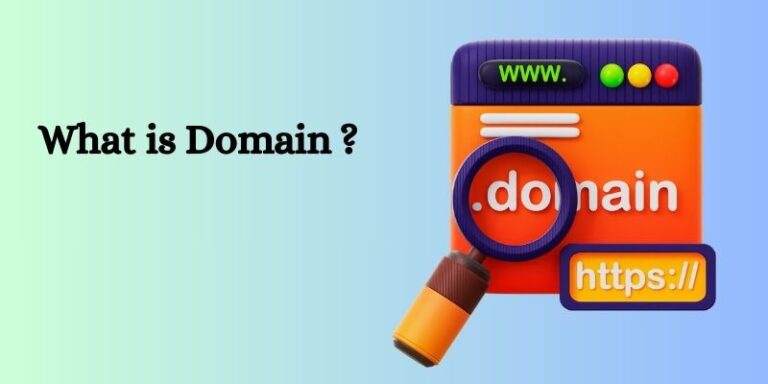
A website consists of different factors. A Domain name is one of the most important ones. It’s actually an address to a site that a person can use to access it.
Understanding it is important if you deal with websites every day. That is what this article will help you with. Here, we will discuss what is a Domain name. We will also describe its different types. In the end, we will discuss how you can purchase one. Let’s get started.
What is a Domain Name?
A Domain name is an easily memorable name for a website. This name is linked with a certain IP address. We require an address to access a website, just as we use it to get to a location. This address is often in the form of a complex IP.
Such addresses are very hard to remember for a general audience. That’s where a Domain name comes to save the day. These complicated IPs are linked with certain domains so that people can easily remember them.
Usually, they take the form of words that are used in human language, like Instagram.com, Google.com, etc. It is the reason a domain name is required while building a website.
It will give your site a proper address that your audience can use.
Types of a Domain Name:
There are different types of a domain name. They provide further information about the site. Here are the details of such domain names:
Top-Level Domain (TLD):
TLD is a common term for a domain extension. It can be found to the right of the “.” (dot). For example, the Top-Level Domain in the address “Instagram.com” is “.com”.
They also come in a few additional varieties. They usually tell the nature of the websites.
.biz: This domain explains that the website is owned by some business.
.org: This indicates that some organization owns this website.
.net: Usually, businesses working in networking use this domain.
Despite their availability, “.com” is being used the most.
Country-Code Top-Level Domain (ccTLD):
This is an extension that is linked with some specific country. It includes two letters of the country name taken from international country codes. Here are some examples:
.se is for Sweden
.de is for Germany
.au is for Australia
.it is for Italy
These domains are used by sites that operate specifically in one country. International sites and businesses can also use these domains. They can do it to specify their country-based content.
Sponsored Top-Level Domain (sTLD):
Sponsored Top-Level Domains are linked with specific communities. These communities can be professional, ethnic, etc. These domains are represented by a sponsor organization.
Here are some of their examples:
.edu is used by educational institutions.
.gov is used by government institutions.
.jobs is used by the Human Resource Management society.
Difference Between a URL and a Domain Name:
People confuse a domain name with a URL. These two are not the same, despite certain resemblances. A URL is a full address that directs users to a certain section or page on a website. It consists of different parts. One of these parts is a domain name.
Here are the details of these parts:
The protocol:
This indicates whether or not the site is secured with an SSL certificate. It can either be an HTTP or HTTPS.
The domain:
This is the site’s address.
The path:
It describes the location of a certain part of a website.
Here’s an example.
In the URL http://www.instagram.com/reels
“http://” is the protocol
“Instagram.com” is the domain name.
“/reels” is the path that indicates that the link will open the reels section of the site.
How to Purchase a Domain Name?
Besides knowing what is a Domain name, you also need to know how to purchase one. Here are some steps you need to follow for that:
Step – 1:
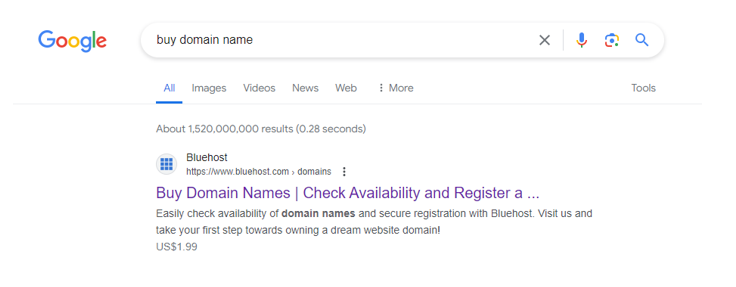
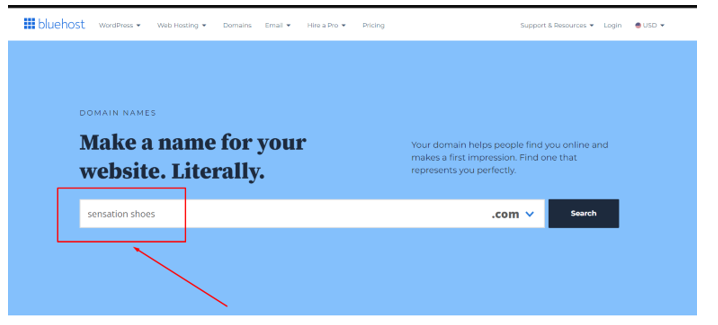
You need to choose a domain name provider in the first place. Online, you may find a number of different services.
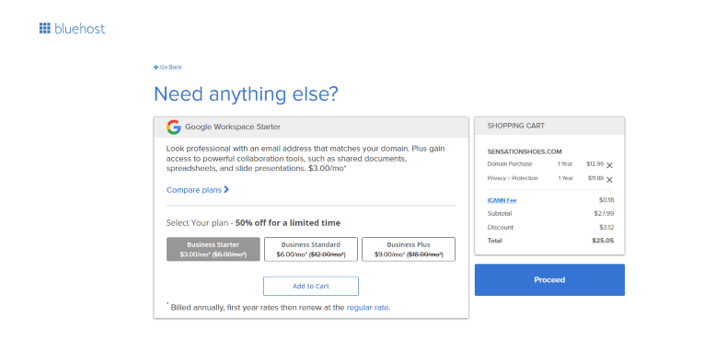
Now, search for a name that is relevant to your website’s nature. We searched for a shoe brand name called “Sensation Shoes”.
Step – 3:
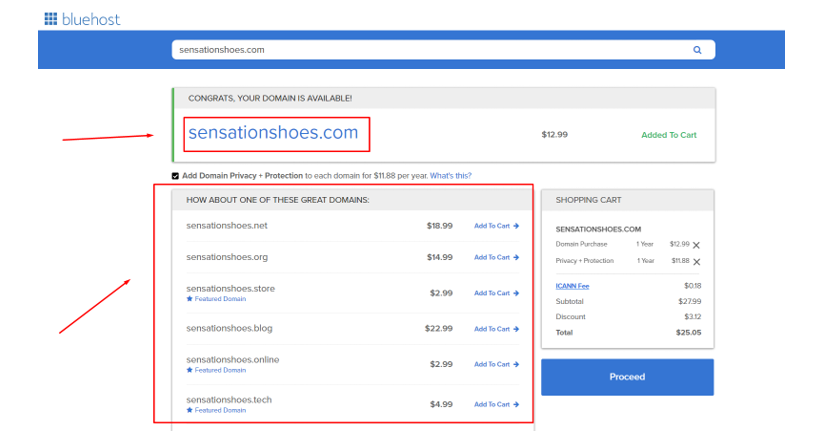
From the received results, pick the domain of your liking. Their prices are mentioned with them.
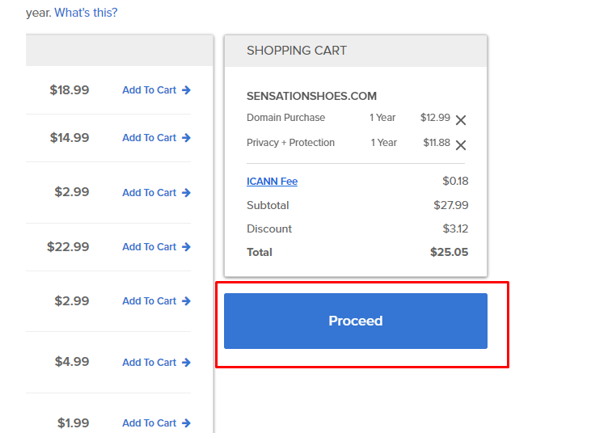
Click on the “Proceed” button to continue.
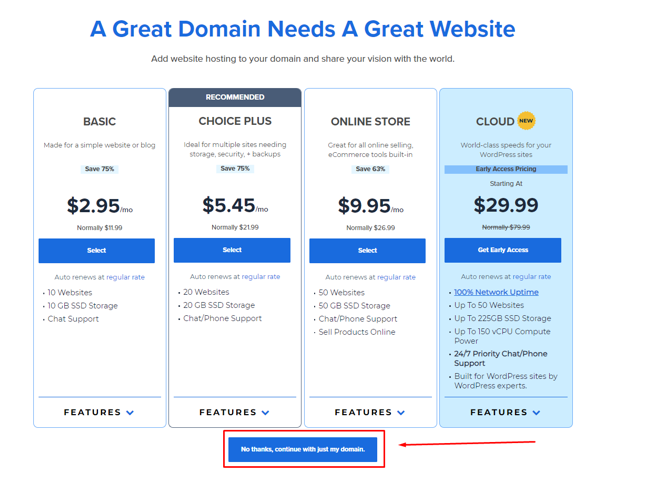
You can pick a hosting plan or just continue with your domain only.
Provide your payment information and purchase the domain. You can start using it for your website after that.
Additional Tips:
There are some tips that can help you pick a great domain name. We have listed them below:
Keep the name short and catchy.
Try to keep it relevant to your business or website purpose.
Pick a name that is easily memorable.
If your brand name is short, add some extra creative words.
Compare prices on different platforms before picking.
Conclusion:
In conclusion, anyone who wishes to build websites should be aware of what is a domain name. It’s an address connected to a certain website. It facilitates users’ access to the website. That is because these addresses are easily memorable as compared to IP addresses.
There are different types of domain names. They tell the nature of the authority that owns the website. It’s also critical to recognize the distinctions between a domain name and a URL.
You can purchase the domain of your liking from any provider. Follow the steps given in the information above for that. Besides this, we have also shared some useful tips that can help you pick a decent name.
FAQs:
Is purchasing a domain name costly?
It depends on the nature of your domain name. The pricing also depends on the platform you’re purchasing it from. Make sure to compare prices before purchasing.
Can I use a domain name other than my business name?
Yes. You can use it. However, it can make it difficult for your audience to find your site.
What happens after my domain registration expires?
You will have to renew the registration after the expiry date. Otherwise, someone else can register it for their site.
Is it possible to sell a domain name?
Yes. You can sell it on different relevant platforms.
Tucker Swanson McNear is one of the richest American writers, commentators and hosts. He hosted one of the famous talk shows Tucker Carlson Tonight at Fox News from 2016 to 2023. His sincere contribution as a political commentator and host always brought him into the spotlight. Here I will inform my readers about Tucker Carlson Net Worth.
Early Life and Background
Tucker Carlson comes from a prominent family. His father, Richard Carlson, was a journalist and director of the VoA. His mom, Lisa McNear, was an artist. He attended St. George’s School in Rhode Island and later studied history at Trinity College in Connecticut. He from after his birth enjoyed the luxuries of life and grew up in a stress-free environment.
Carlson married Susan Andrews and has four children with her. They both married soon after their meet-up at St. Georgia School in Middletown at Rohde Island.
Career Highlights
Tucker Carlson started his livelihood as a commentator while working in various media outlets. He started gaining popularity from his first political debate show “Crossfire”. His sharp commentary and conservative viewpoints made him a recognizable figure in the media landscape.
Carlson joined Fox News in 2009. He hosted several shows, including “Tucker Carlson Tonight.” His nightly talk show became a platform for featuring interviews with guests from diverse backgrounds discussing political issues.
Carlson’s provocative statements on immigration, race, and political correctness often sparked controversy. This decision allowed him creative freedom and a global audience, even though it meant forgoing a substantial salary.
As of 2024, Tucker Carlson’s net worth is approximately $30 million, considering his earnings from various sources.
Tucker Carlson Net Worth:
During his tenure at Fox News, Tucker Carlson earned a substantial salary. Tucker Carlson net worth was reportedly increased in this period of his life.. However, in 2023, Fox News terminated his contract, leading to a significant change in his career trajectory. Rather than joining another network, Carlson decided to launch his own show on Twitter. This move allowed him creative control and a global audience. However, it came at a cost: he forwent a staggering $25 million in annual salary.
Beyond television, Carlson has authored books, participated in speaking engagements, and explored other ventures. These additional income streams contribute to his net worth. Carlson may have additional income streams from investments, endorsements, or business ventures.
Aspect
Details
Occupation
Conservative Political Commentator, Writer
Born
May 16, 1969
Place of Birth
San Francisco
Nationality
USA
Show
Tucker on X (formerly Tucker Carlson Tonight on Fox News)
Net Worth
Estimates vary, but likely in the tens of millions of dollars (Almost $30 million)
Source of Net Worth
Salary from Fox News (until 2023), salary from current show, book deals, speaking engagements
Sources of Income
Tucker and Neil Patel co-founded Daily Caller in 2010 – a right wing and opinions sharing property. It is basically the conservative version of The Huffington Post. Its 1/3 stake was sold to Patel at an undisclosed amount in June 2020.
Carlson has authored several books, including titles like “Politicians, Partisans, and Parasites,” “Ship of Fools,” and “The Long Slide.” His book deals have extended his reach and significantly contributed to political and journalistic discourse.
Recently, Carlson announced a new partnership with PublicSq, a pro-America online marketplace. PublicSq offers values-aligned businesses and services to over 1.5 million users. This move reflects his desire to explore different paths beyond traditional network television constraints.
FAQs:
1. What is Tucker Carlson’s Net Worth?
Tucker Carlson’s net worth in 2024 is about $30 million.
2. What is Tucker Carlson Doing Now?
Carlson is developing his own digital platform with a friend at Tucker Carlson Network.
3. How to Watch Tucker Carlson on Twitter/X?
You can watch Tucker Carlson official tweets and podcasts on hi X account, @TuckerCarlson.
4. Where Does Tucker Carlson Live?
Tucker Carlson lives on Gasparilla Island, a barrier island in Florida that straddles the border of Charlotte and Lee Counties.
5. Why was Tucker Carlson Fired?
The exact reasons for Tucker Carlson’s firing remain speculative, but a combination of factors likely led to his departure from Fox News. inappropriate comments, a blindsided decision from the network, his new show on Twitter, and a potential breach of contract are responsible factors for his firing.
Starting a website may sound difficult to a lot of people. But the reality is quite the opposite. It’s a lot easier – especially in 2024. A lot of tools and resources are available to assist you in quickly building a website. It is possible to construct a suitable strategy in a matter of hours.
We are going to assist you with it. We will talk about how to start a website in this article. It’s going to be a very simple procedure. Now, let’s get going.
How to Start a Website?
The following steps can help you start a site effortlessly:
Step 1 – Analyze your Website’s Purpose:
First, you need to analyze your site’s purpose. There’s a very valid reason for that. There are 3 main types of a website.
Statistic websites
Dynamic websites
E-commerce websites
Their details are a topic to be discussed some other time. However, analyzing your purpose will help you pick one of them.
This analysis will also help you choose tools and resources accordingly. Besides this, the whole content strategy will also be based on it. If you find it hard to analyze the site’s purpose, you can take the help of a professional.
Step 2 –Pick a Domain Name:
The next step in the process of how to start a website is picking a domain name. It is the URL of your website. Consider it one of the most important points of the procedure. That is because it will impact your audience when they hear or type it.
So, you have to pick it carefully.
Here are some useful tips for this:
Make sure to keep it short. Longer domain names can look annoying to users.
Keeping it catchy can help.
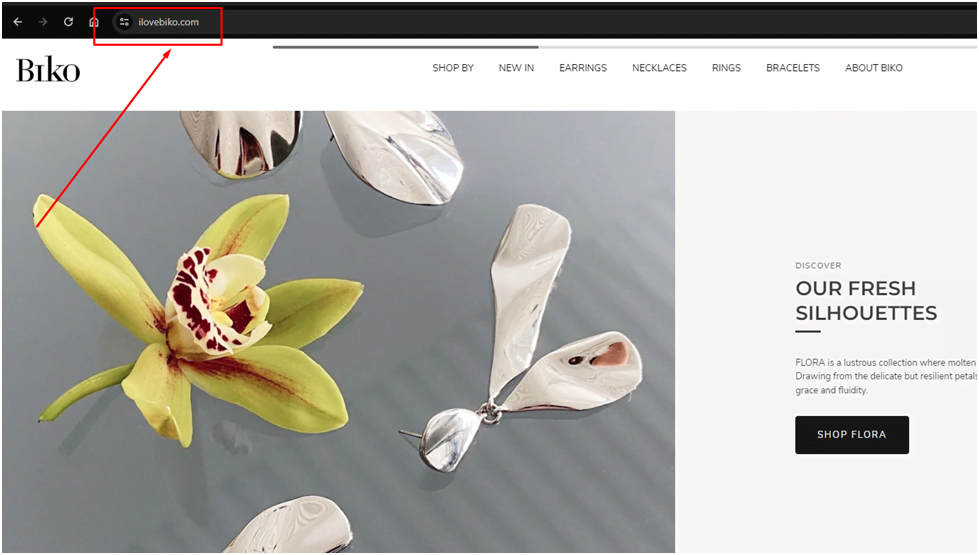
You can add extra words to make it look creative. For example, a famous jewelry brand Biko has added “I love” words in their domain.
Make sure to purchase a “.com” domain. That is because most of the siteshave this domain.
Step 3 – Purchase a Hosting Service Provider:
A hosting service provider is a platform that hosts your site on servers. Their basic purpose is to help you maintain and store your site data.
Many hosting services are out there. So, picking one can be a little confusing.
These tips can be helpful:
Make sure the service has over 99% uptime.
The performance and speed of the service should be high.
It should offer top-notch customer service along with technical support.
Make sure their pricing plans are in your budget.
The service should offer security and automated backups.
Not every service may provide each of these features. So, it’s wise to analyze your requirements first. Some of the top providers are:
A website-building platform allows you to build your site from the beginning. There are 2 major types of these platforms.
Website Builder:
Website builders provide a simple approach to establishing a website. That is because they provide a straightforward drag-and-drop interface.
People who have very little technical knowledge tend to use these builders. The problem with them is that they offer very less customization features.
You are only limited to using a few templates. This indicates that these platforms are for simpler sites.
Examples of these platforms are:
Wix
Squarespace
Shopify
Content Management System (CMS):
A CMS offers complete control over website building. This means you can structure and design the site according to your requirements. These platforms are a little complex to learn. However, most of them now have very user-friendly interfaces. With a little learning, you can start using them.
An interesting thing about these platforms is that you can install different plugins. They help you build and control your website.
It’s a wonderful solution for sites that continuously change their content or demand high-level customization.
WordPress is the most famous among them. Some others include:
Joomla
Drupal
Adobe Experience Manager
Step 4 – Design your website:
Design is an important factor in your website. It may not be important for ranking but it helps enhance user experience. While designing the site, think beyond aesthetics. This means that you should also consider the functionality in mind.
Most platforms offer built-in design templates. You can use them or create your own design. Make sure that the design fits with your website type. Understanding the target audience can also help with it. You can even take the help of web designers for this.
Step 5 – Structure your website:
No, you have to start structuring your website. This means that you need to create different sections of it. Some of the major sections include:
Homepage
Menu
About page
Product listings (if included)
Contact page
Besides structuring, you also have to input website copy. It helps you tell the user what the site (or its specific page) is about.
Step 6 – Launch the Site:
Once the above-discussed steps are completed, launch your website. Make sure to test it before launching. The testing can include different things. For example, you can check if the content uploads at optimal speed. Also, checking included links can be helpful.
You can also ask your coworkers or friends to take a look at it. It will give you a different perspective. This will be helpful in assuring that the site is good to launch.
Step 7 – Start Creating Content:
Now, you can start creating and uploading content on your website. You may need a proper content strategy for a new website. The main goal is to publish informative and useful content for users.
Also, do not forget to upload relevant media. This contains images, videos, infographics, etc. You may need to employ a content producer if you’re not excellent at it yourself. Constantly posting material keeps your site alive. It also allows you to rank your website higher in search engine rankings.
So, that’s how you start a website.
Conclusion:
To conclude it all, starting a website in 2024 is a breeze. A lot of resources have been launched that are helping people with it. They completely automate the whole process for you. This means that you can create a website by following a very few simple steps.
The whole process begins with identifying the site’s purpose. That is because it helps understand what type of site you need to build. After that, you pick a domain name and hosting service. Once it’s done, build a site on a website-building platform.
Now, design and structure the site. Once it’s all done, launch the website.
Frequently Asked Questions (FAQs):
Is starting a site costly?
This heavily depends on the tools and resources you use for building a website. Usually, these resources have affordable plans. Still, you should compare them to pick the most affordable one.
Is it necessary to include the brand name in the domain name?
Yes. Including your brand’s name in the domain is an important thing you need to do.
Does the website design impact mobile-friendliness?
Yes. The design of your website can impact its mobile-friendliness.
The sports industry has a lot of money in it including the NFL. Players get paid millions because of this. The same is true with Patrick Mahomes. He’s a football player with the Chiefs in Kansas City.
He loves the game and is a gifted quarterback. That’s the reason he’s earning a respectable salary in this field. This will be the article’s focus today. We’re going to talk about Patrick Mahomes net worth here. We will also take a short look at his football career. Let’s start.
Career Highlights:
The football career of Patrick Mahomes began in high school. He was a baseball and basketball player as well.
Pitching and playing basketball, he believes, helped him build the skills of a quarterback.
Mahome kept on playing college football at Texas Tech.
His NFL career began with the Kansas City Chiefs signing him in 2017. His rookie season was spent being the replacement for Alex Smith. He set a lot of records when he became a starter the very next year.
Patrick kept on shining in the team for upcoming years. He was able to assist the squad in winning its first Super Bowl in fifty years in 2020. Patrick was as impressive in the Super Bowl. He was voted the MVP of the Super Bowl and the squad won the championship.
He still shines at the Kansas City Chiefs team.
Patrick Mahomes Net Worth:
Patrick Mahomes Net Worth ranges from $40 to $90 million. Some also think that this is a very low net worth as compared to his salaries. But it’s important to recognize that he is still relatively young in his career. Thus, accumulating a substantial net worth may take some time.
Profession
Athlete, NFL player
Birthplace
Tyle, Texas
Birthdate
Sep 17, 1995
Net worth
$40 million to $90 million
Salary
$59.35 million
Contract deal worth
$450 million
Contract duration
10 years
Salary and contract details:
When he first started his NFL career, Kansas City signed him for around $16.2 million. The duration of the deal was four years. This contract came with a $10 million signing bonus.
When he became eligible for a contract extension, people believed the deal would break records. And it did.
He struck a $450 million contract extension with Kansas City. If everything goes as planned, this deal will be worth $503 million.
Mahome has a salary of $59.35 million overall. Here are its components:
Basic salary:
$1.33 million
Signing bonus:
$20.57 million
Restructure bonus:
$12 million
Contract incentives:
$2.5 million
Roster bonus:
$22.4 million
Workout bonus:
$550,000
Real Estate:
Patrick’s real estate portfolio isn’t very diverse. He purchased a house in Kansas City for around $1.9 million. He listed his home for $3million.
Patrick then purchased an underdeveloped lot for around $400,000. He completed the construction of his dream house a year ago.
So, Patrick Mahomes net worth is somewhere between $40 million to $90 million. The exact amount hasn’t been disclosed yet. Mahomes started his football career in college football. Kansas City Chiefs signed him and his NFL career started. With his talents, Mahomes helped the team reach and win the Super Bowl.
Most of his earnings come directly from playing football. We have discussed more about his career in the information given above.
FAQs:
Is Patrick Mahomes the best NFL player?
Yes. He is revered as the best NFL player.
Does Mahomes have other resources for earning besides football?
No. Mahomes does not have any other major income source except football.
What is the duration period of his contract extension?
The duration period of his contract extension is 10 years.
Contrary to popular assumption, becoming a chef may lead to high-income levels. One of the best instances of this is Gordon Ramsay. He is a British chef who has achieved fame as a celebrity. It’s the reason he can make a lot of money.
He earned his money through different sources. Over the years, the renowned chef worked in different TV shows. In addition, he owns many eateries that contribute to his income. That will be the main focus of this blog. We’ll talk about Gordon Ramsay net worth here.
Now let’s get going.
Gordon Ramsay – Ladder to Success:
Ramsay wasn’t in the cooking profession from the beginning. He aspired to be a successful footballer – as all Englishmen want to. He had a hobby of cooking, however. Due to an injury, Gordon had to abandon the dream of becoming a footballer.
After that, he found his passion in hospitality.
He started learning hotel management. That’s where he found his love for the cooking profession. He had the honor of working under some famous chefs. They include Albert Roux, Marco Pierre White, and Guy Savoy.
After gaining experience, he started working as a head chef for different restaurants. Later, he opened his own eatery called Restaurant Gordon Ramsay. He became a focus point of the documentary Boiling Point in 1999. That was the start of his TV career. He ran shows named Kitchen Nightmares and Hell’s Kitchen.
He’s still working on being the best and running different cooking shows.
What is Gordon Ramsay Net Worth?
Gordon Ramsay Net Worth is $220 million in total. He was able to make this fortune via different resources and investments.
Gordon signed a deal with Lion Capital in 2019. It was to launch the Gordon Ramsay North America. The goal of this deal was to open different restaurants across the United States. The worth of this deal was $100 million.
The restaurant group owned by Ramsay brought in about $96 million. His business was greatly impacted by the COVID-19 outbreak. The revenue during this time was only around $7.9 million.
Overview:
Birthdate
Nov 8, 1966
Birthplace
Johnstone, Scotland
Net worth
$220 million
Salary (2019/2020)
Around $63/$70 million
Income per episode
$225,000
Number of restaurants
58
Gender
M
Nationality
United Kingdom
Analyzing Income Resources:
Gordon Ramsay net worth demands an analysis of income resources. Let’s do that now.
Annual Salary:
Gordon’s annual salary isn’t definite. This means it can vary each other. That is because the nature of the projects he works on keeps changing. However, in 2020, he earned $70 million. A year before, the number was $63 million.
Income per episode:
He is quite wealthy from his TV endeavors. Each episode brings in about $225,000 for him.
Real Estate investments:
Gordon Ramsay owns a large portfolio of real estate. Here’s its overview:
Bel-Air home: $6.75 million.
London home: $3.5 million
3 more homes in Fowey: $13 million.
Conclusion:
In conclusion, Gordon Ramsay net worth is $220 million. It is a big amount for a chef. His exceptional talents made him more than just a chef. He has now become a celebrity that is revered throughout the world.
Ramsay started his career by learning hotel management. After that, he earned experience and worked as head chef. He later opened his own restaurants. He now runs different TV shows as well as restaurants. Gordon also owns a decent amount of real estate.
FAQs:
Is Gordon Ramsay a billionaire?
No. The chef is not a billionaire yet.
How many restaurants he owns?
Gordon owns a total of 58 restaurants in different locations.
Whether you’re passionate about sharing travel tips, tech updates, DIY crafts, or deep dives into health concerns, creating engaging content is just one piece of the puzzle. To start and manage your blog, you will need some perfect blogging tools to write, design, and analyze your way to success. This guide will equip you with the best blogging tools for beginners, from writing assistants and stunning image creators, to social media management and analytics, all designed to make your blogging experience smooth and enjoyable.
What are Blogging Tools?
Bloggers create, manage, and improve blog content with the help of several blogging tools. These resources can help manage and create content, perform analytics, and do SEO, among other things. Blogging tools help bloggers save time, organize different parts of blogging, and enhance blog’s overall performance and quality.
Selection of the Right Blogging Tools
A few factors will determine the tools you include in your blogging process: your goals, the gaps you want to fill with tools, whether or not the tool is worth the money, and your selections.
Identify the purpose of the tool.
Check it out and determine how often you use it
Access the price
Evaluate your selection of tools.
A List of Top Blogging Tools for Beginners
Building a house and starting a blog are comparable tasks. With them, it is possible to enable blogging with the necessary tools. These are a few essential resources arranged based on the specifications for blogs.
Tools for Idea Development
It could be challenging to generate fresh ideas, and you might need clarification when compiling original content ideas. These are the blogging resources for finding the ideal idea.
1- Quora
Users worldwide visit the questions-answers website Quora to discuss various topics. With millions of users, Quora is a well-known platform for sharing thoughts and could be a great place to find post ideas for your blog.
Key Features and Pricing Plan
Participants in the conversation share their perspectives and come from multiple racial backgrounds, castes, races, and nations.
Quora allows you to promote your goods or services while responding to questions.
It’s a free tool that is helpful for blogging.
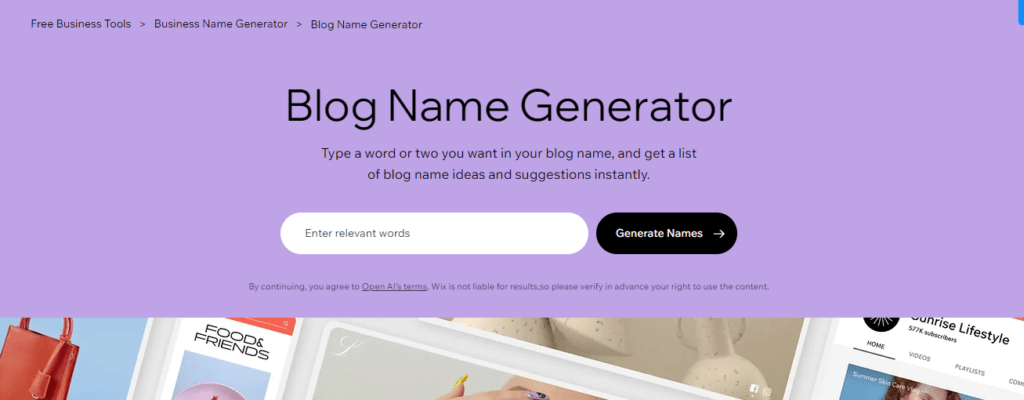
2- WIX Blog Name Generator
Are you struggling to come up with a compelling blog name? Do not worry; we have a tool to help you create a unique name for your new project. It is a free tool. Use the provided space to describe your article with keywords and adjectives and develop alternative titles.
Key Features and Pricing Plan
Blog Name Generator enables you to choose the best and most memorable name for your blog.
Helps you pick a title that appeals to your intended readership.
Tools to Boost Your Writing Efficiency and Speed
Do you want to write like no one else, quickly and effortlessly? These writing tools will enable you to write more efficiently and swiftly than ever before.
3- Grammarly
Grammarly is the most popular grammar and spell checker available online. More than 10 million people, including students and professional writers, use it to find and correct spelling mistakes. Create a document, then upload or paste the text to check for errors.
Key Features and Pricing Plan
There are various versions of the program available that can offer basic to thorough grammar checks.
Grammarly’s free edition provides spell, grammar, and punctuation checks.
The premium version allows you to edit writing styles like tone, clarity, and brevity. The tool also has an integrated plagiarism detector to assist you in staying vigilant about your writing.
$12 per month when annually billed.
4- Hemingway
The Hemingway app is an editing tool that highlights and fixes common mistakes and sentence structures to help identify writing errors and areas for improvement.
Key Features and Pricing Plan
It finds and fix spelling, syntax, flow, and sentence structure mistakes using color-coded highlighting.
Hemingway Editor’s desktop version has formatting and direct publishing features and can be used on any device without internet access.
It is $10 for an individual plan for a month.
Tools for Content Organizing
It can be challenging to arrange the content for your blog, so let us face it. These tools will enable you to handle your content like an expert!
5- Google Calendar
My personal favorite for keeping everything organized for my blog is Google Calendar. It can also be used as an editorial calendar and is free. Google has created a fantastic calendar and time-management application.
Key Features and Pricing Plan
When planning content, you can use this calendar to arrange your work
Set deadlines for your writing tasks.
The application allows you to share your schedule with other team members and will remind you of the tasks that are coming up.
6- Notion
The Notion is a productivity and project management tool that allows you to make cards and take notes to help you organize your work. It is a place of work where a group can arrange goals, duties, and deadlines.
Key Features and Pricing Plan
Simple design and potent functionality offer a place to write, organize, and think.
Notion makes using it extremely simple by providing users with tutorials and guides.
You can buy a standard package for $15 per month.
7- Asana
Asana is a great tool for work organization. This tool simplifies tasks and projects, whether for teamwork or solo projects. You can use it for blogging task management to get more done in less time with enhanced efficiency.
Key Features and Pricing Plan
Asana’s perfect project workflow, which can track everything from A to Z, is why bloggers like me adore it.
Whether you are planning a paper or organizing your thoughts, Asana can keep you informed and on task.
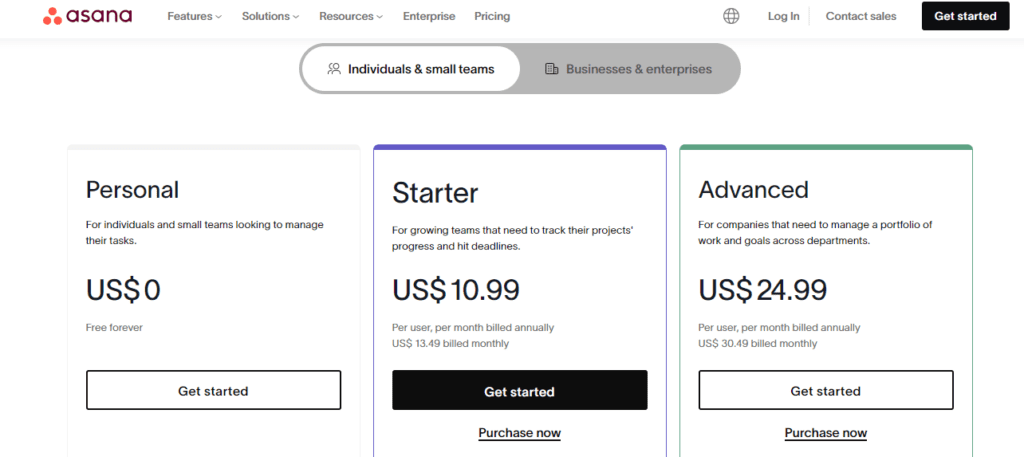
The basic plan at Asana is $49 per month.
Tools for Content Optimization
Search engines like Google always appreciate well-optimized content. To produce content that is both optimized and targeted, make use of the tools listed below.
8- SEMRush
Semrush is an all-in-one digital marketing tool designed to boost your online presence. It combines multiple tools at a place, helping marketers with tasks like keyword research, web analysis, keyword tracking, PPC and content marketing etc.
Key Features and Pricing Plan
SEMrush makes targeting your audience, increasing your online presence, and getting marketing insights simple.
SEMrush assists you in identifying new trends within your industry.
Auditing its SEO assists in increasing the visibility of your page.
It helps generate more leads, better understand your pages, and optimize them for search engines.
A pro plan is $149 per month.
9- Yoast SEO
Yoast SEO is a feature-rich WordPress SEO plugin that assists in the optimization of WordPress websites and pages so that they appear higher in search engine results (SERPs).
Key Features and Pricing Plan
You can use meta descriptions. With the help of this plugin’s numerous features, title tags, and keywords, you can push content to your front page.
It facilitates the return of rich results from Google, including image, product, and star rating results.
With the help of this tool, you can quickly enhance the keywords and content of your blog and raise its search engine ranking.
It’s a free blogging tool.
10- Ahrefs
Ahrefs is a tool used in SEO and digital marketing for increased ranking and visibility. It makes keyword research and rank tracking easier for bloggers while helping in content optimization as well.
Key Features and Pricing Plan
With its assistance, you can measure the parameters of your website and the quality of your links while gathering all the pertinent data about your backlinks.
Ahrefs is one of the most fantastic resources available if you want to publish and promote optimized content.
$249 for the Standard Plan.
Social Media Automation
Social media automation tools will assist you in implementing automation from the beginning.
11- Social Champ
One of the most robust and complete social media management tools is Social Champ, which enables users to automate their social media profiles like pros. Facebook, Twitter, Instagram, LinkedIn, Pinterest, YouTube, Google Business Profile, and TikTok are just a few platforms for which the tool offers automation support. You can begin with automated social media posting and much more by linking your social media profiles to the tool.
Key Features and Pricing Plan
The tool inside the dashboard offers a workspace for making posts with images, videos, and GIFs and managing incoming messages.
We are improving return on investment, developing marketing campaigns, recycling content, producing reports, and monitoring analytics.
Social Champ is $26 per month with a 7-day free trial.
12- Sprout Social
Another social media automation and management tool that you can use to master blog marketing and automation is Sprout Social.With several premium features, this tool can automate your social media posts.
Key Features and Pricing Plan
Users can use it to arrange tasks and designate them for other team members.
You can plan your campaigns and posts with Sprout Social.
Additionally, it offers social listening and analytics tools, which help automate your social media accounts.
Its pricing plan is $199 per month with a start-free trial.
13- Zoho Social
A complete social media management tool that could assist you in automating your blog marketing is called Zoho Social. With this helpful tool, you can handle many social media tasks.
Key Features and Pricing Plan
For Scheduled posts
Keep track of mentions
Make personalized dashboards and do a lot more with them.
Its many features include a bulk scheduler, a release calendar, and reposts.
You can buy Zoho Social for $10 for a standard package.
Tools for Stunning Blog Images
Another essential element that could draw a reader in is your blog’s images. Although it is not simple to create them, you can make stylish images for your blog with these tools.
14- Canva
Canva is a graphic design application that makes the digital design process more accessible. This facilitates account creation and functions with iOS and Android apps and web browsers.
Key Features and Pricing Plan
The tool makes image editing and project-based learning more engaging with a straightforward drag-and-drop interface appropriate for younger students.
The classroom can be used for group brainstorming and individual project creation. Thanks to Canvas optimization for Chromebooks, even the most demanding image-based projects can be edited smoothly on most computers.
You have to pay $55 for the premium plan.
15-Unsplash
Photographers from all around the world share their high-resolution images on Unsplash for free. Bloggers can use these royalty free images in their blog posts and social media posts.
Key Features and Pricing Plan
The team has carefully selected over 850,000 images on the site to guarantee that only the best are added daily.
You can also collect photos and display your best shots using the platform. You can further download and use those pictures for any of your projects.
16- Adobe Express
You can choose from various expertly created templates, edit photos, videos, and documents with quick actions, and produce marketing materials for different media outlets.
Key Features and Pricing Plan
Creative Cloud Express lets you quickly create various graphics, including infographics, ads, flyers, posters, logos, short films, animations, and social graphics.
You can browse professionally designed templates, use quick actions to edit images, videos, and documents, and create marketing assets for various media platforms.
You can customize your designs by combining and layering easily applied effects, filters, and textures.
If you are interested, you will pay $9.99 for the monthly premium package.
Tools to Support Your Outreach Initiative
Do you need help launching an outreach campaign for your blog? These are the outreach tools to assist you in beginning the process.
17- Snov.io
The most incredible CRM for effective contact management and cold emails is Snov.io. Finding more convertible leads, confirming contacts, monitoring lead progress, and automating outreach are all simple.
Key Features and Pricing Plan
With 2000+ integration options, personalized, automated outreach can save your sales team time while increasing sales.
One of the best tools for bloggers to find emails is this one, which can assist them in launching campaign outreach.
Its starter package is $per month.
18- Ninja Outreach
Ninja Outreach is the best tool for blog expansion. These days, influencer marketing is becoming famous and it is a fantastic method of marketing to grow your blog.
Key Features and Pricing Plan
All companies of all sizes are intended to use this tool. Ninja Outreach makes outreach marketing easier for all businesses, including agencies, large corporations, and small ones.
It costs $49 per month if billed annually.
Tools to Increase Your Output
Are you fed up with putting things off and failing to finish tasks on time? Now, let us discuss some blogging tools that will increase your output.
19- Toggl
The time-tracking app Toggl makes work better. Among the most well-liked choices available is this one. Toggl offers a basic and user-friendly time-tracking solution.
Key Features and Pricing Plan
To track your time on each task.
This app can also increase productivity and help you finish your assignments on time.
Toggl works well for groups as well as individuals.
The starter plan is $9 per month.
20- Pocket
Pocket is the best online option to read excellent articles and socialize. Engaging stories can be saved and read at any time.
Key Features and Pricing Plan
Great suggestions that have been carefully chosen just for you are also available.
An adjustment of text sizes, font styles, or viewing modes for concentrated reading.
I was listening to articles on the Pocket app, which is free.
Content Analysis Tools
It takes more than just publishing content to analyze it; you also need blogging tools. These choices are incredible.
21- Google Analytics
A website analytics service called Google Analytics provides vital statistics and analytical tools for marketing and search engine optimization (SEO) purposes. This service is free for Google account holders and is part of the Google Marketing Platform.
Key Features and Pricing Plan
KPIs from Google Analytics are used to monitor site performance and compile visitor data.
It is among the best tools for assisting businesses in determining the primary sources of user traffic, gauging the effectiveness of marketing initiatives and campaigns, and monitoring the accomplishment of objectives.
Spotting patterns and trends in user behavior.
Evaluate the content of your blog and improve its ranking.
22- Google Search Console
With the free tool Google Search Console, users can monitor keyword performance, track down problems with their blogs, and get news from Google.
Key Features and Pricing Plan
It offers information on optimizing your website for Google’s index and how well it functions in organic search.
Search Console does not provide data on other audience segments like direct traffic, advertisements, or the number of site referrals; it only provides information about web search traffic.
Google Search Console is also a free blogging tool.
Final Words
With this extensive knowledge of tools, you can become a proficient blogger. Blogging can benefit newcomers wishing to establish their brand, boost website traffic, or generate revenue from their blog. Choosing the appropriate blogging tools that support your objectives and optimize your process is essential to success. The tools included in this guide cover every aspect of blogging to make your journey towards starting a blog smooth and enjoyable.